
XLiQ for Microsoft BI.
The model works. The reporting layer doesn’t.
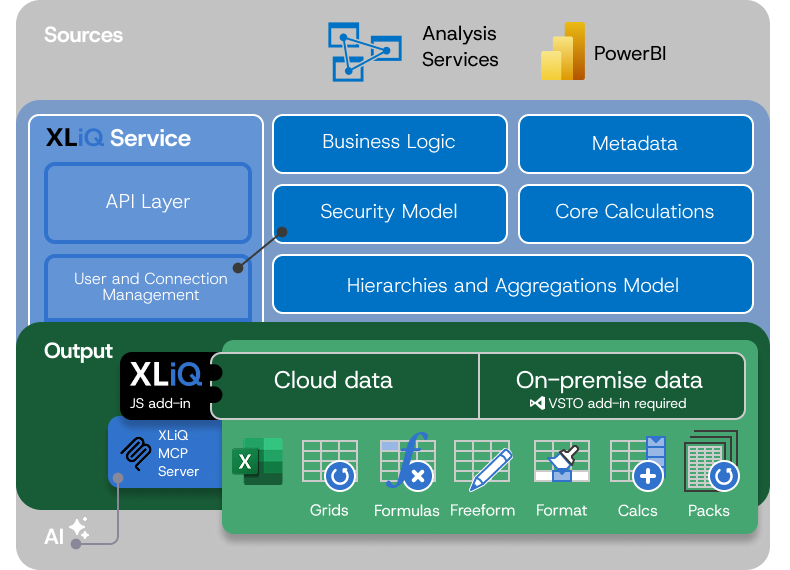
Your Power BI and Analysis Services models have the data and logic Finance needs — but the reporting tools don’t give them the control they require.
So they export data. Rebuild logic in Excel. And create static, disconnected versions.
XLiQ pairs full Excel formatting and layout control with a live governed connection to the model — no rebuilds, no copies, no second source of truth.
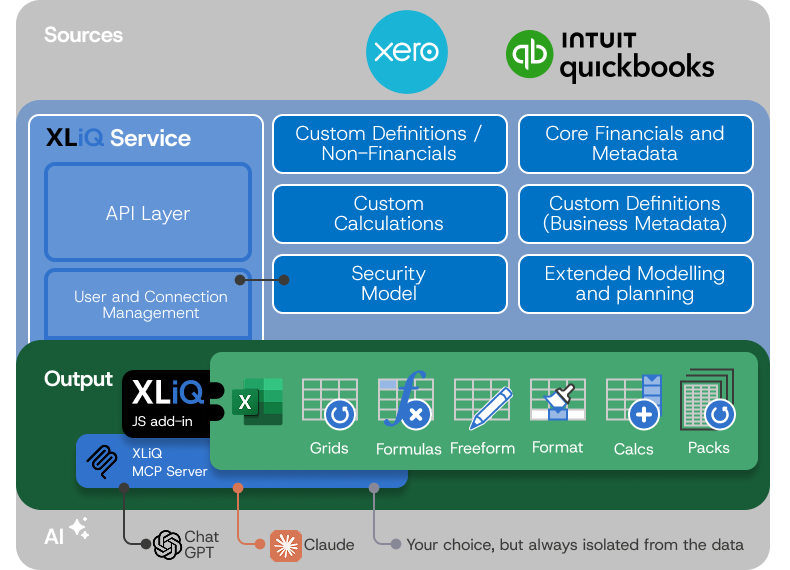
XLiQ for Cloud Accounting.
Coming soon for Quickbooks and Xero.
Reporting and planning — without the limits
Standard reports only go so far. So teams export data to Excel to build what they actually need—creating duplication and time‑consuming, error‑prone workflows.
Work directly on your data in Excel with enterprise level reporting capabilities, dimensional modelling and structured
planning.
No exports. No templates. No limitations.
Use Cases
Everyone has their preferences, and for Finance, that often means only Excel will do.

Management Reporting
Connecting directly to Power BI semantic models or Analysis Services means everyone is comparing the same things, no more maintaining separate lists or hierarchies that quickly get out of sync.

Variance Analysis
Comparing planned to actual performance shouldn’t be an exercise in frustration. Connecting to live data sources means Actuals are actually actual, not last Thursday’s download.

Board Packs
We’ve all experienced the cycle of producing packs that need adjusting up until the deadline for the board meeting. Downloads are the overhead that keeps you up at night. See how live data helps you overcome that.